
Browser Use vs Browserbase: my honest comparison

Browserbase and Browser Use can both automate work in a browser, from collecting product data to filling out forms. Choosing between them comes down to what you want to build: a task you hand to an AI agent, a custom agent inside your application, or browser infrastructure for scripts you already run.
I’m Skyvern’s co-founder and CEO by the way. We build a competing product, so I have a stake in this comparison. But I promise I won't promote our product (even though it's a great alternative to both).
I’ll compare both tools and share my honest thoughts on both.
Updated on Sep. 24 2026: I initially wrote it back in 2025, and a lot has been shipped on both sides, so I rewrote the full comparison taking into account all their new features
Quick verdict
Browserbase is a better fit for recurring hosted tasks with a fixed output format. You can save the expected fields with the task, then use its inspector to investigate failed runs.
Browser Use is a better fit when engineers need to customize the agent in Python. Its open-source library accepts your own tools. Browser Use Cloud is a separate managed service, with continued conversations that suit tasks developing over several requests.
What matters to your team | Browserbase | Browser Use |
|---|---|---|
Custom agent tools | Managed Agents use fixed built-in tools; custom agent code is a separate option. | The open-source Python agent accepts your own functions as tools. |
Structured output | Save an output schema with a reusable agent. | Cloud V4 returns text for your app to validate; the Python library supports output schemas. |
Follow-up requests | Reuse the agent configuration; each run gets a separate browser session. | Continue the same conversation and reuse its live browser. |
Existing scripts | Connect Playwright or Puppeteer, with a runtime available for deployment. | Connect Playwright or Puppeteer and pay for browser usage. |
Failed runs | Inspect session replay alongside console and network logs. | Read agent events, with live preview and optional session recording. |
Browser infrastructure and AI agents
Both companies let you use their browser infrastructure separately from their agents. Your existing scripts can control the browser directly. With their AI agents, you describe the task in natural language, and large language models choose the browser actions needed to complete it.
The practical difference is how much you want to change beyond those instructions. Browserbase’s managed Agents provide a configured service; Browser Use’s open-source library lets engineers change the agent itself.
Headless browsers
Both services let Playwright and Puppeteer scripts connect to a headless browser running in the cloud. It loads web pages and runs their JavaScript, while your code controls the interaction. You can keep your existing web automation without adopting either company’s agent.
Browserbase’s advantage is the service around that browser. Its Functions runtime provides serverless infrastructure for deploying automation code, and its inspector helps you investigate failures. This is a convenient combination when your team needs somewhere to run and support its scripts.
Browser Use’s browser service is attractive when you already deploy and monitor the code elsewhere. You pay for browser time and traffic without a monthly subscription. For occasional browser automation beyond Browserbase’s free allowance, I’d choose Browser Use rather than pay for deployment features I don’t need.
Custom tools
Browser Use has the advantage when an agent needs to call your application’s code. Its open-source library accepts custom tools. An agent checking an invoice, for example, can call a Python function that looks up the corresponding internal record. That automation logic stays in your application.
Browserbase’s managed Agents use fixed built-in tools. You can change their instructions, but cannot register that lookup function as a custom tool. Browserbase also supports building your own agent in code, including through its open-source Stagehand SDK; that is a different approach from configuring a managed Agent.
Browser Use is the more direct choice for this kind of Python integration because adding tools is already part of the library’s interface. Browserbase’s managed service is more convenient when its built-in tools cover the task and you want it to handle agent execution. Browser Use Cloud offers managed execution too, so using Browser Use does not require self-hosting.
Data extraction
Browserbase is more convenient for a hosted web scraping job that needs the same fields on every run. You define those fields in the agent. Browser Use Cloud leaves your application to parse the returned text and check the data.
Structured output
Browserbase makes the output format part of a reusable agent configuration. For product-price collection, you can define a product name and a numeric price with JSON Schema. The schema stays with the task when you run it again.
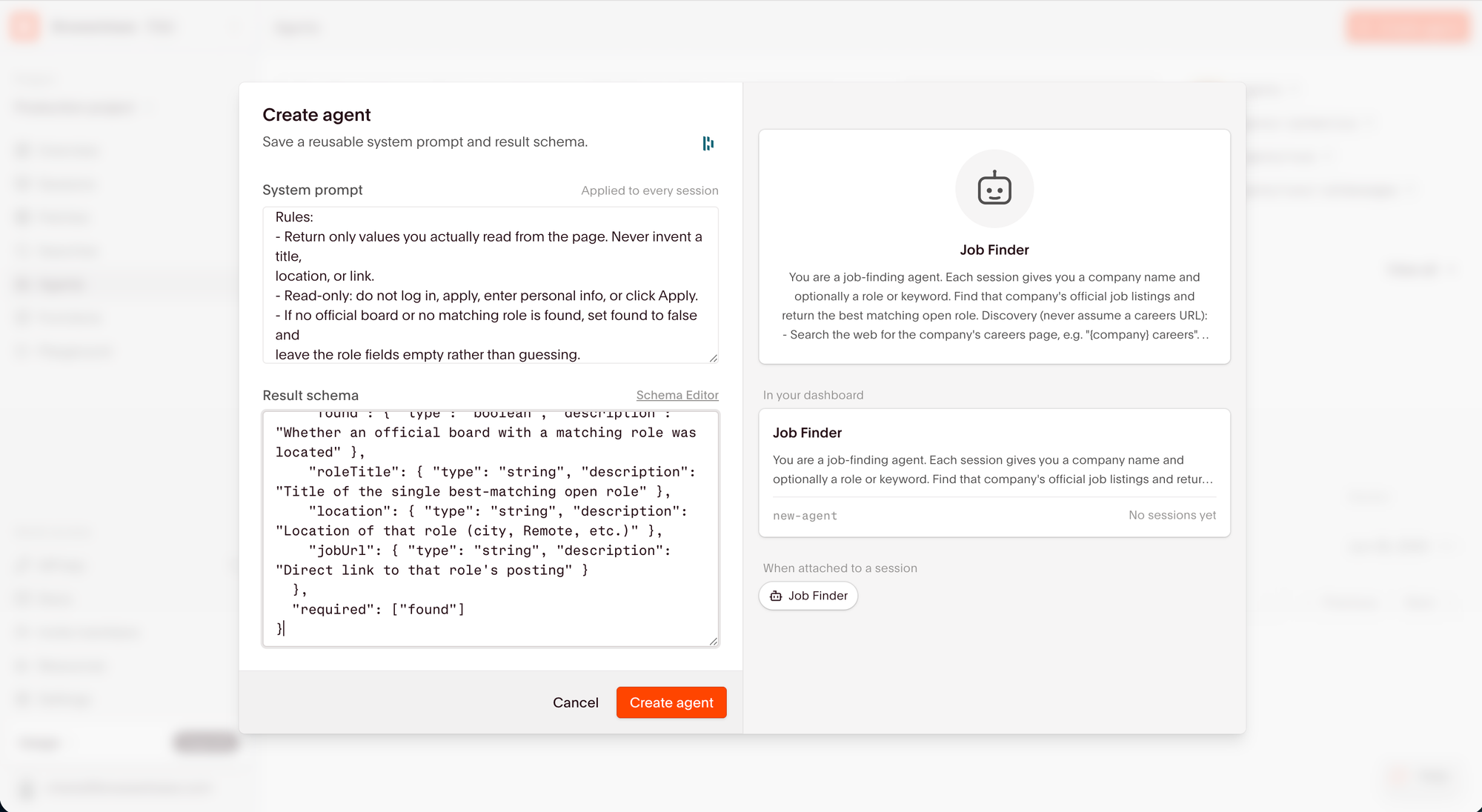
Browserbase saves the output fields alongside the agent’s instructions.
Browser Use can return structured data too, but the setup differs between its cloud service and open-source library:
- Cloud V4: Ask for JSON in the task, then parse and validate the returned text in your application. Your code handles missing fields or asks the agent to try again.
- Open source: Define the output fields and types through a Pydantic model in Python.
Browserbase’s advantage over Browser Use Cloud is keeping the expected format with the saved agent. For recurring data collection that feeds another system, I prefer that explicit configuration. The same advantage does not apply against Browser Use’s Python library, which also supports schema-defined results.
Follow-up requests
Browser Use Cloud is the better fit when a task continues across several requests. Its sessions retain the conversation and can reuse the browser while it remains alive. After collecting a price, you could ask whether it includes shipping within the same conversation.
Browserbase reuses the agent’s instructions and output schema, but each managed Agent run gets its own browser session. That suits independent jobs with the same requirements. Browser Use Cloud provides a more direct way to continue research from the previous answer.
Repeated data collection
Browser Use Cloud can save a working script in a workspace and reuse it on later runs. For a recurring web scraping task, the agent can run that code against the live page and repair it if the page structure changes.
Browserbase’s reusable Agent configuration keeps the instructions and expected result. Browser Use’s saved-script approach also retains the code that did the work. I’d consider it when I wanted to keep refining a particular extraction script across runs. Each later run still starts an agent and uses model tokens; saving the script does not make subsequent runs free.
Session management
Both tools preserve website logins between runs. Browserbase has the stronger case when you also want a built-in interface for inspecting failed page requests.
Saved logins
The names differ, but the basic purpose is the same:
- Browserbase Contexts: Persist cookies and browser state for later sessions.
- Browser Use Profiles: Save login state and load it into a new browser.
Both let you reuse a login while the website still accepts it, without keeping the original browser open. Session management alone would not decide this comparison for me.
Failed runs
Browserbase’s session inspector combines replay with console and network logs. If a form submission fails, you can check the request’s status code and response before changing the agent’s instructions.
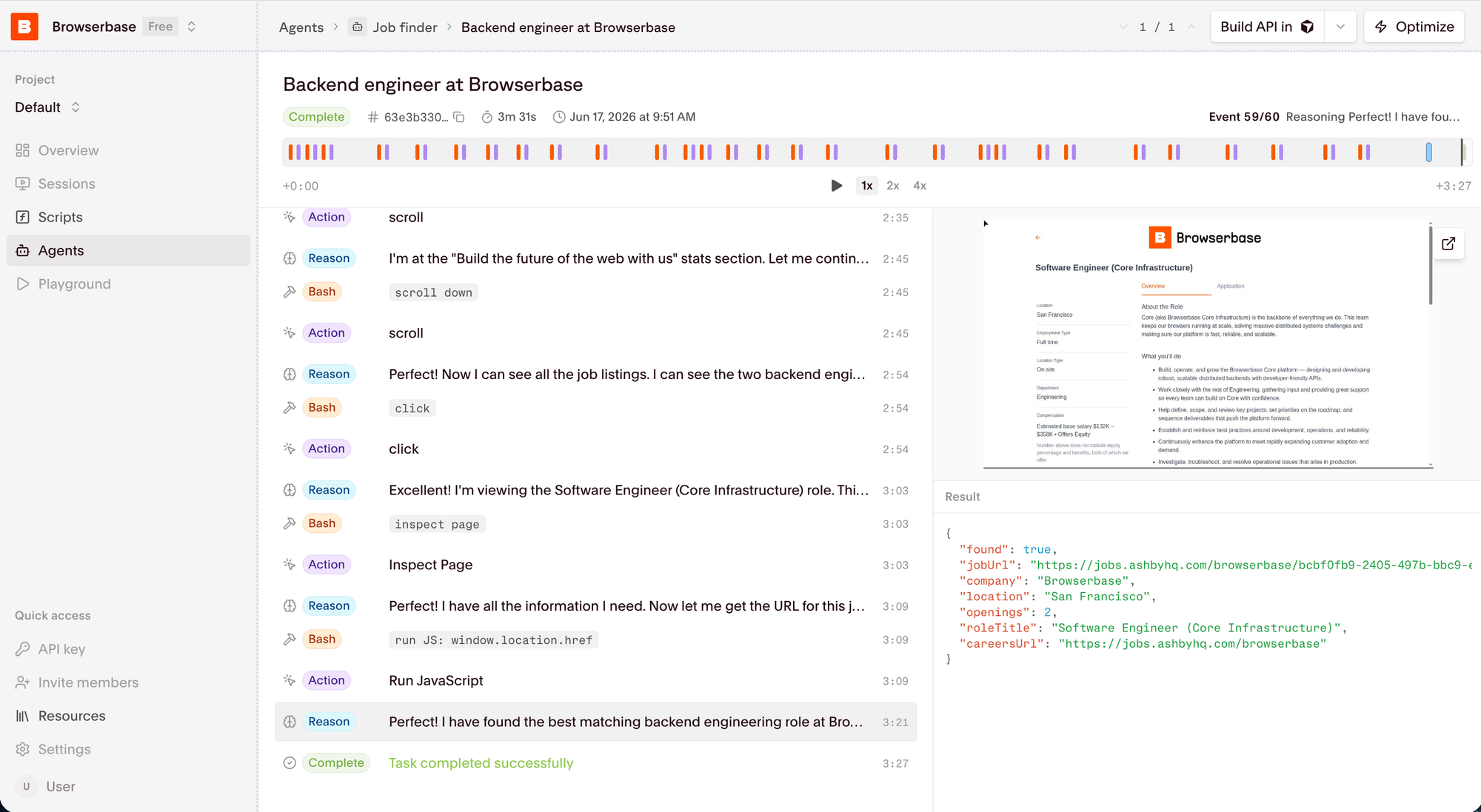
Browserbase’s run view shows the agent’s actions beside the browser and result.
Browser Use supplies ordered events from agent runs, including tool calls and model activity. It also offers live preview and session recording, although recording must be enabled for API-created browsers.
Both provide APIs for custom monitoring. Browserbase is the more convenient choice if the team supporting the automation wants the replay and network details together in a ready-made inspector.
Scaling
Browser Use gives a new project more concurrent sessions without a monthly plan. Browserbase offers fixed capacity allowances on its paid plans. Access to stealth features also differs, which matters when the target site performs anti-bot checks.
Concurrent sessions
The published limits apply differently:
- Browserbase: 3 concurrent browsers on Free, 25 on Developer and 100 on Startup. Paid allowances are shared across the organization.
- Browser Use: 10 concurrent browser sessions to start, shared between agents and browsers within a project. Capacity increases with qualifying project spend; existing projects can have different limits.
Browser Use gives a new project more starting capacity than Browserbase’s free tier. For a batch that needs 25 browsers immediately, Browserbase publishes a paid plan with that allowance. With Browser Use, I’d confirm the project’s capacity before planning the batch.
Stealth and CAPTCHA solving
Both companies offer managed infrastructure for sites that perform anti-bot checks, but the included features differ:
- Browserbase: The free tier excludes stealth mode and CAPTCHA solving. Developer and Startup include basic stealth and CAPTCHA solving; advanced stealth is on Scale.
- Browser Use: Managed browsers include stealth protections and handling for supported CAPTCHAs. Residential proxies are enabled by default, with traffic billed separately.
Browser Use is the better starting point for a small trial that needs stealth mode: Browserbase’s free tier would not let you test that requirement. If you already need a paid Browserbase plan for its capacity, the included protections make staying with that service more attractive.
Pricing
Browser Use has a lower entry cost for paid browser usage. Browserbase bundles usage into monthly plans, so its value depends on whether you also want the included service features. Hosted AI agents add model charges to the comparison.
Browserbase pricing
Browserbase’s plans include:
- Free: 1 browser hour and 3 Agent runs, with no included proxy traffic.
- Developer: $20 per month for 100 browser hours, 15 Agent runs and 1 GB of proxy traffic.
- Startup: $99 per month for 500 browser hours, 50 Agent runs and 5 GB of proxy traffic.
Additional browser time costs $0.12 per hour on Developer and $0.10 on Startup. Proxy overages are $12 per GB on Developer and $10 on Startup. Model usage can add to the bill.
If you expect to exceed the included Agent runs, confirm the additional-run rate with Browserbase. Its billing tables do not list a per-run overage price.
Browser Use pricing
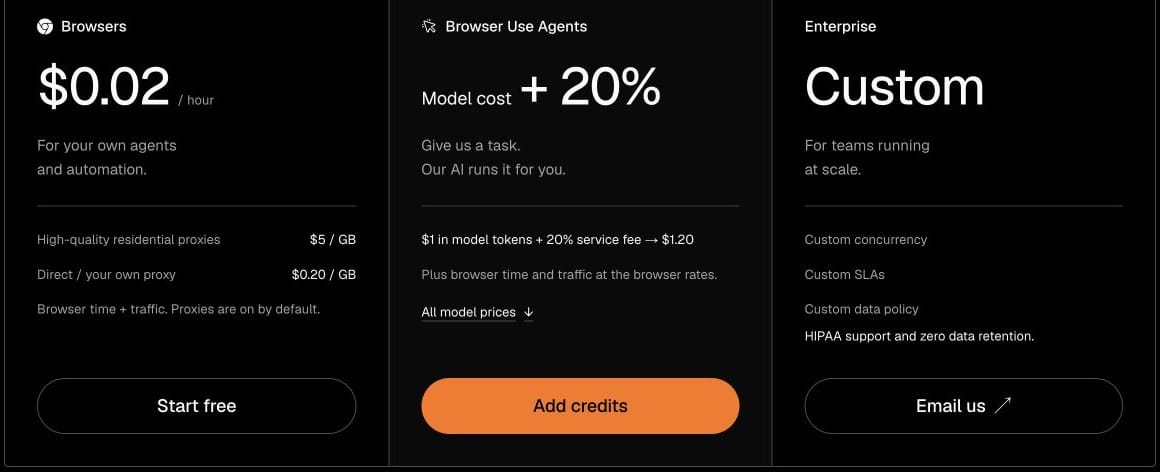
Browser Use’s pricing separates the browser service from the hosted agent:
- Browser time: $0.02 per hour.
- Traffic: $5 per GB through residential proxies, or $0.20 per GB for direct traffic or your own proxy. Your proxy provider may charge separately.
- Hosted agent: Model cost plus a 20% service fee, alongside browser time and traffic. The published V4 token prices already include the fee.
- Credits: Top-ups from $5, with no subscription or expiry.
Which is cheaper?
Browser Use is my pick for occasional browser automation beyond Browserbase’s free allowance. You can buy credits from $5 and pay for the time you use, instead of moving to the $20 monthly Developer plan. Browserbase becomes more attractive if you want its inspector or higher starting concurrency and can use the included hours.
Browser Use also has lower proxy rates after Browserbase’s allowances run out: $5 per GB versus $12 on Developer or $10 on Startup. Browserbase includes 1 GB or 5 GB respectively before those overages apply.
For hosted agents, the browser-hour price does not settle it. Browser Use bills for model consumption, while Browserbase combines Agent-run allowances with usage charges. I’d get Browserbase’s excess-run rate before comparing a recurring agent job. Without it, a precise total-cost comparison would be guesswork.
Wrapping up
I recommend Browserbase for recurring hosted tasks that benefit from a saved output schema and a built-in inspector. Its appeal is having those parts of browser automation ready for your team to configure and use.
Browser Use is the better choice when custom Python tools are central to the application. Its Cloud service is also worth choosing over Browserbase for work that continues through follow-up requests.
Now, about Skyvern
Skyvern is a better fit for workflow automation that an operations team needs to maintain. An engineer may be comfortable changing Python, while the person who owns the process needs to adjust a condition without editing code.
Browserbase’s agent editor centers on instructions and the expected result. Browser Use’s open-source library gives engineers control over the agent in Python. Skyvern’s visual editor lets a process owner assemble the workflow on a canvas, with explicit loops and conditions.
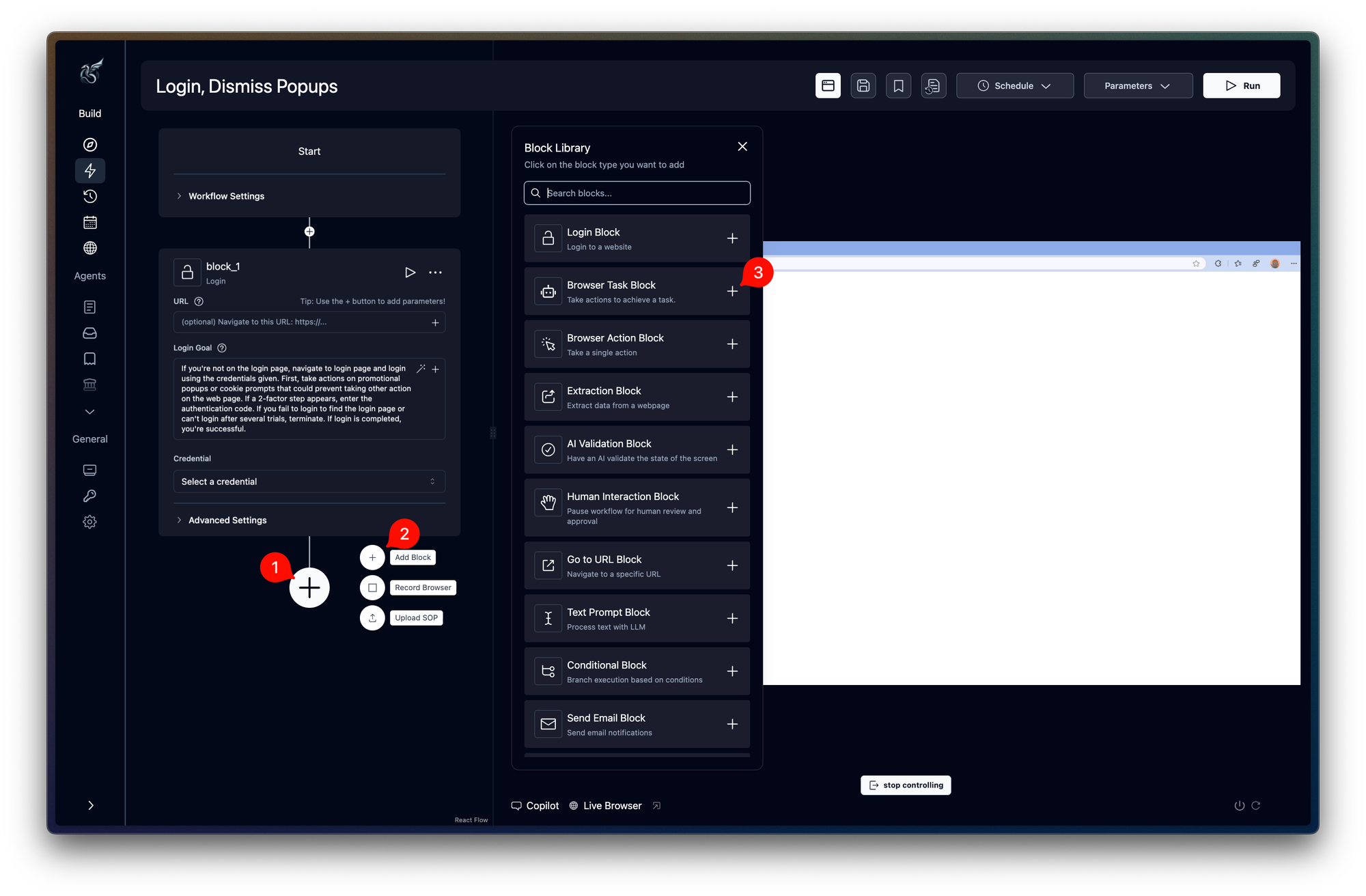
For recurring work such as collecting invoices from pharmacy and wholesaler portals, that gives the process owner a way to maintain the sequence. Engineers can still connect it to existing applications through Python and TypeScript SDKs.
If one engineer owns a small task end to end, a visual workflow may add little. If an operations team needs to change the process, that is the reason I’d try Skyvern.