
Skyvern vs Browser Use for Browser Automation

If your team spends hours moving between portals, downloading invoices or filling out the same forms, you probably already know what you want to automate. Choosing between Skyvern and Browser Use comes down to how you’ll build it and who on your team will keep it running.
I’m Suchintan, Skyvern’s co-founder and CEO. We built Skyvern with enterprise teams in healthcare, finance and insurance in mind. Their process experts often aren’t developers, and I think they should be able to automate the work they understand without depending on an engineer for every change.
That’s why I’d recommend Skyvern for those teams. You’re reading this on our blog, so you’d reasonably expect me to favor what we’ve built. But I want this comparison to help you choose. I’ll be clear about what Browser Use does well, where Skyvern has limitations, and when I’d recommend Browser Use instead.
Skyvern vs Browser Use: the quick verdict
Skyvern is a better fit when the people who know the process need to build and change the automation. Its visual builder gives nontechnical teams a way to do that, with Python and TypeScript SDKs for the engineers connecting it to the rest of the business.
Browser Use is a better fit when engineers want to build AI browser automation into an application and customize the agent itself. It also offers a hosted agent, so that flexibility does not require running your own browser infrastructure.
What matters to your team | Skyvern | Browser Use |
|---|---|---|
Who changes the process? | Process experts can arrange tasks, extraction and conditions in a visual builder. | Engineers customize the agent through code; the hosted agent also accepts plain-language tasks. |
How much can engineers customize? | Python and TypeScript SDKs, plus browser automations combining Playwright and AI actions. | An open-source agent with custom tools and application-level control. |
Who runs the infrastructure? | Skyvern Cloud or your own self-hosted deployment. | A hosted agent, a local agent using managed browsers, or a fully self-hosted setup. |
How is usage billed? | Plans with monthly credit allowances. | Pay-as-you-go browser time, traffic and model usage. |
How do Skyvern and Browser Use architectures differ?
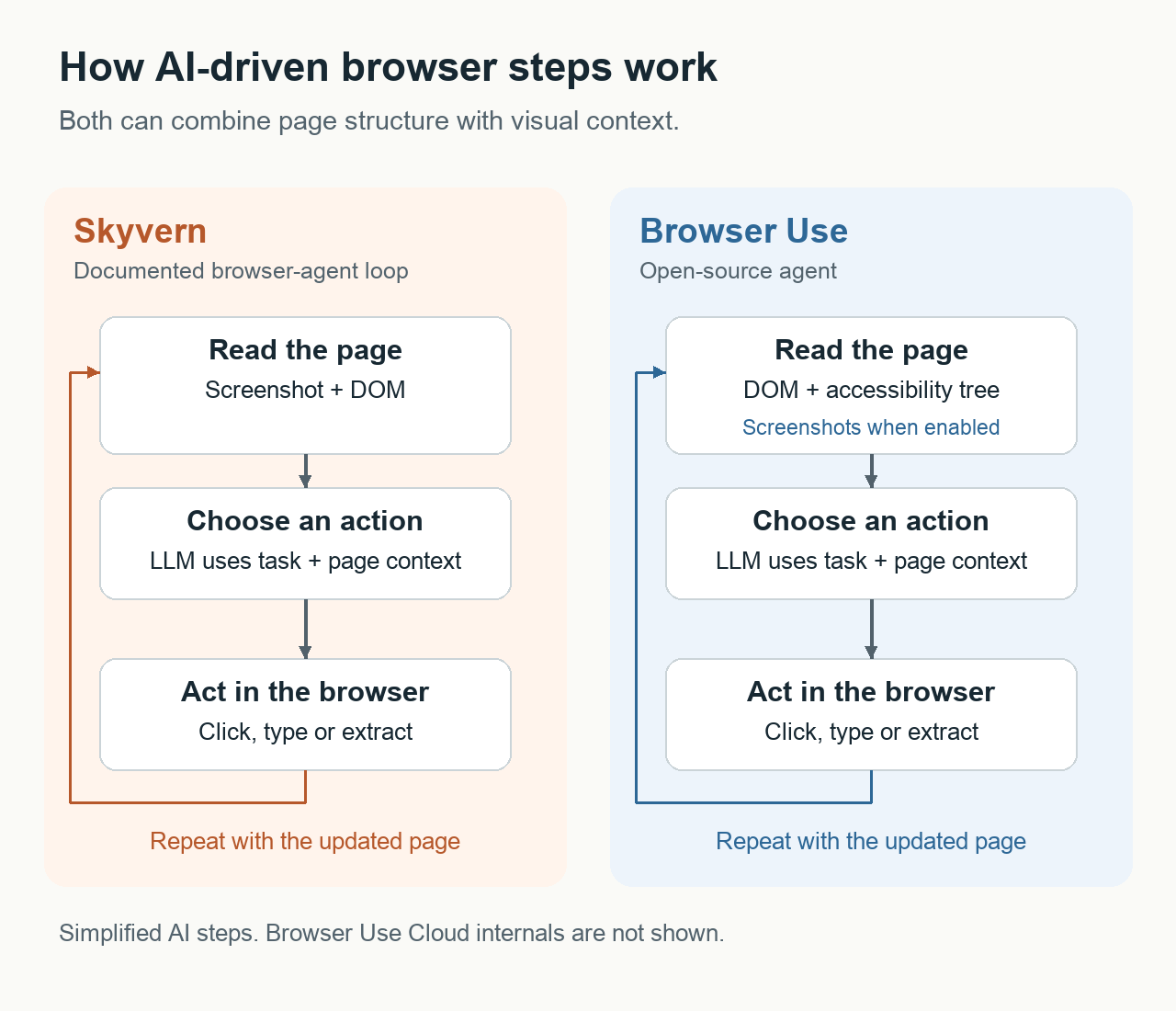
Skyvern’s agent loop uses computer vision to interpret the visual layout in screenshots and combines that information with a simplified DOM, the page’s structure of elements and labels. The DOM provides precise identifiers for interactive elements such as buttons and form fields. We use this combination so Skyvern can follow your instructions on unfamiliar sites without a custom script for each one.
A large language model (LLM) uses those inputs and the task instructions to choose an action. Playwright, a library for controlling web browsers, executes the action. Skyvern then checks whether the task is complete and reads the updated page if more actions are needed.
Browser Use’s open-source agent gathers page information through Chrome DevTools Protocol (CDP), the interface software uses to communicate with Chrome. It combines the DOM with the accessibility tree, which describes page elements by their roles and names.
Browser Use’s vision settings control whether screenshots are included in the model’s input. Engineers can disable them or let the agent request them when needed. The model’s chosen actions execute directly through CDP.
Skyvern’s advantage for engineers already using Playwright is that our SDK adds AI actions to the page interface they know. They can keep scripted steps and add AI where interpretation is needed.
Browser Use supports that combination through custom Playwright tools and a shared browser session, which engineers connect to its agent. Skyvern provides both types of action directly in its SDK.
Enterprise workflows: where I’d choose Skyvern over Browser Use
We built Skyvern for teams where the person who understands a process is often not the person writing the software. The practical difference is how much that process expert can build and change themselves, and how an engineer can extend it.
A visual builder for the people who know the process
Skyvern’s no-code workflow builder lets a process expert arrange browser tasks, extraction and conditional branches. They can see the sequence, change a task’s instructions and decide what should happen next. That is why I recommend it for operations teams that need to maintain their own automations.
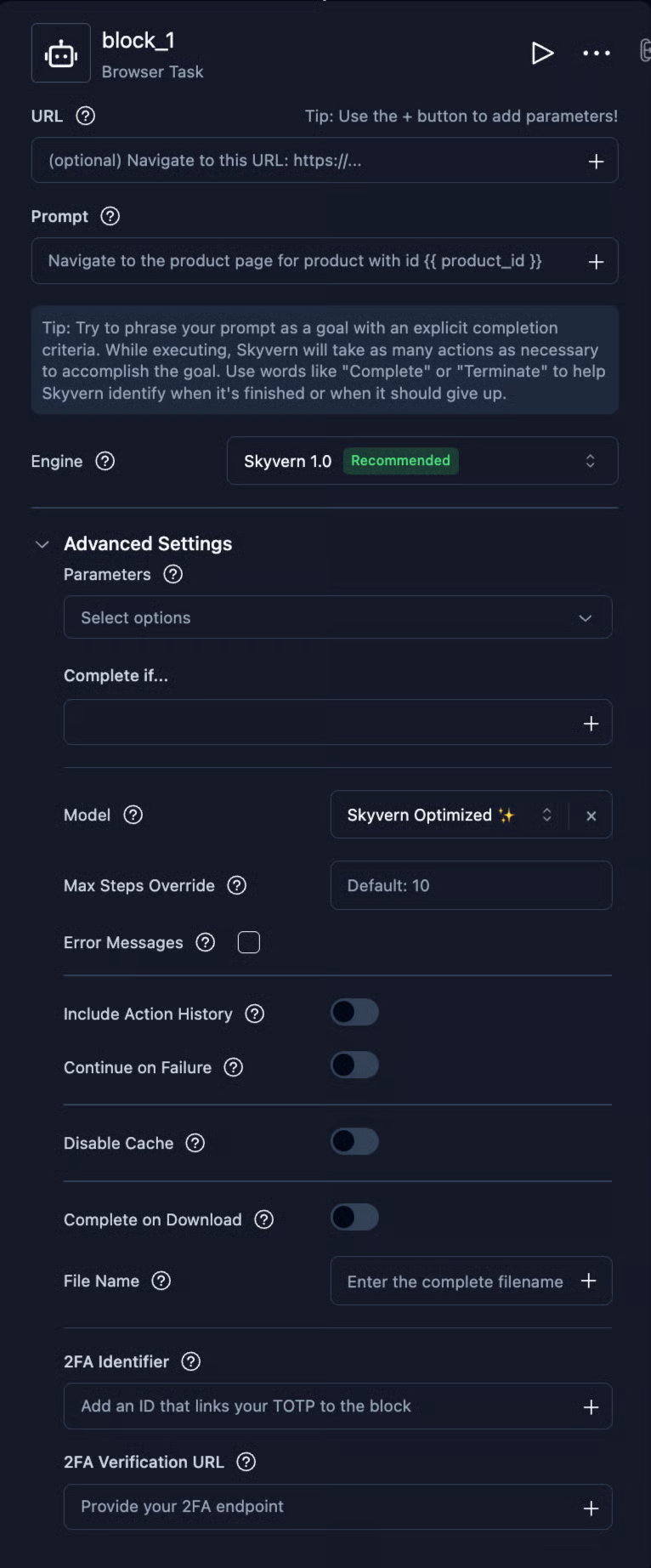
Browser Use’s main agent offers a different experience: describe a task in a prompt, or customize the agent and its tools in code. It does not offer the same block-based authoring experience as Skyvern. Browser Use also has Workflow Use, an early project with a recorder and visual workflow interface, but its maintainers currently advise against production use. For a nontechnical domain expert, that is a meaningful distinction.
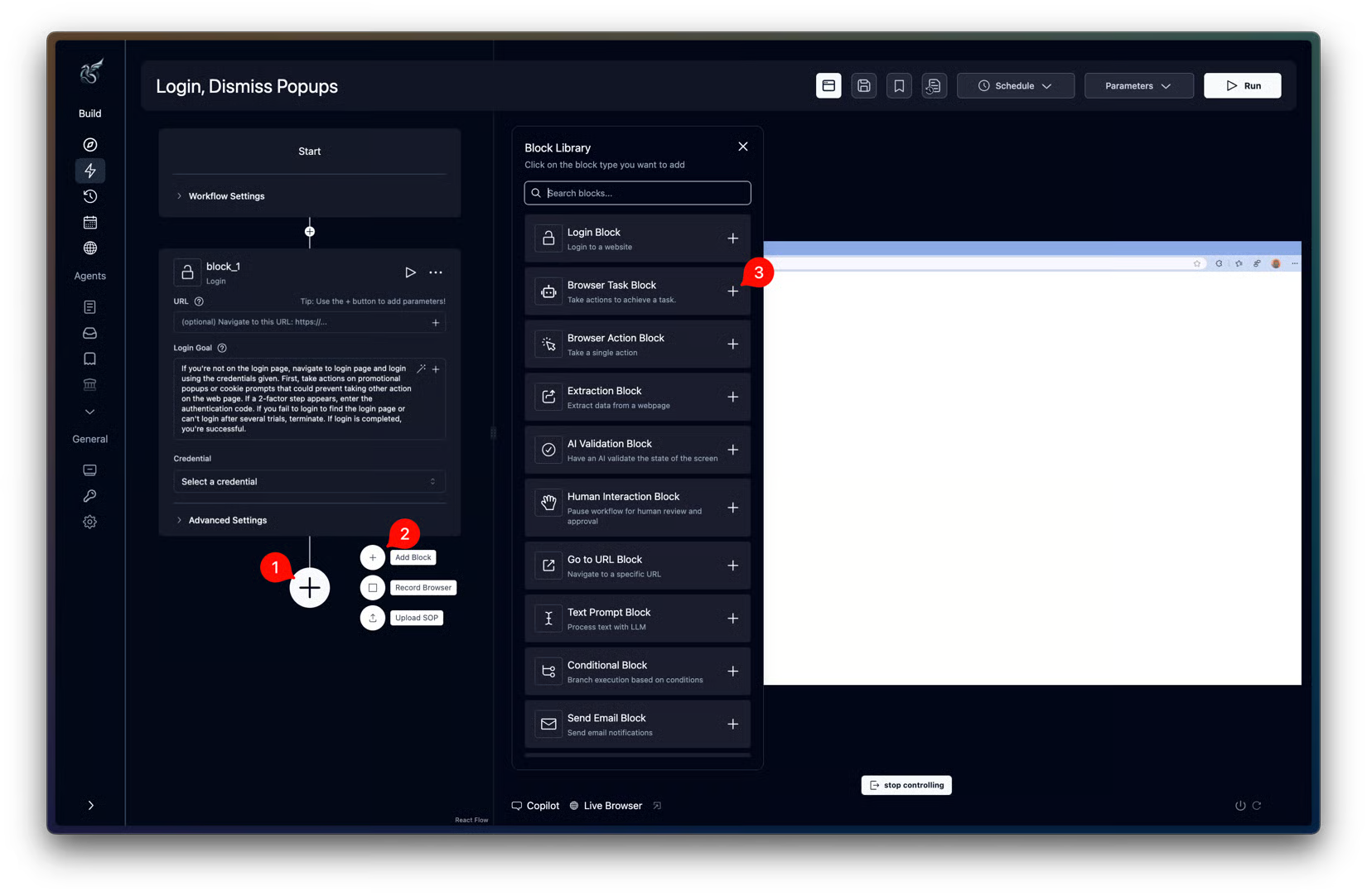
Both browser agents accept natural language prompts for tasks such as form filling and data extraction. With Skyvern, those instructions sit inside a workflow the process owner can inspect and rearrange.
Room for engineers to work in code
A visual builder should not leave engineers boxed in. Skyvern’s Python and TypeScript SDKs let them pass business inputs into saved workflows and receive results through webhooks. Its browser automation SDKs also combine Playwright with AI actions, so an engineer can use direct page controls for predictable steps and an agent for a more open-ended task.
Browser Use is particularly useful when the agent needs custom tools and logic inside an existing application. Engineers can shape the open-source agent around that application. For a hosted integration, internal tools can make API calls to Browser Use’s REST API to submit tasks and retrieve results. They authenticate with an API key and use the hosted agent. Skyvern’s advantage is giving process experts a visual way to work while still giving engineers code-level access; Browser Use’s appeal is the freedom to build around the agent itself.
File downloads and file operations
Skyvern’s file-handling blocks connect document downloads, parsing and delivery in one workflow, with built-in destinations including SFTP, Amazon S3, Azure and Google Drive. Cloud workflows can also unpack ZIPs and split PDFs, so downloaded files can move directly into processing and storage.
Browser Use’s workspace files persist across runs, letting an application reuse inputs, scripts and generated files. Your integration can list those files and request download URLs to retrieve them for further processing or delivery. Each URL expires after 60 seconds, but the file remains stored and you can request a fresh link.
Open-source vs cloud: what must your enterprise operate?
Both products offer cloud execution for teams that don’t want to manage their own browser infrastructure. Skyvern Cloud runs tasks in cloud browsers; Browser Use Cloud hosts the agent, browser sessions and file workspace. With either, your team supplies access to the portal accounts the automation needs.
Skyvern’s full self-hosted Docker Compose deployment packages the API server, browser runtime, web UI and Postgres database together. Your team manages server capacity and uptime, configures the model and proxy provider, and pays model costs directly. It also installs updates and backs up the database. Cloud moves those infrastructure responsibilities to Skyvern.
Model processing is a separate decision. Skyvern sends screenshots to the configured LLM, which can be a remote provider or a local model through Ollama. Running Skyvern on your servers does not, by itself, keep that processing local.
Browser Use offers an intermediate option: run the open-source agent on your infrastructure and connect it to a managed cloud browser. Its cloud browser infrastructure includes proxies, live preview and recording. Your engineers retain control of the agent code and runtime while Browser Use operates the browsers. They still configure the model and maintain the agent application. Full self-hosting puts the browser under your control as well; the fully hosted Cloud agent moves agent execution to Browser Use.
The source licenses also differ if you plan to modify the software. Browser Use’s MIT license permits modification and sale, with copyright and permission notices retained. Skyvern uses AGPL v3: if you modify it and let users interact with that version over a network, you must offer those users its Corresponding Source. AGPL permits commercial use; it does not automatically require publishing every application connected to Skyvern.
Running workflows in parallel
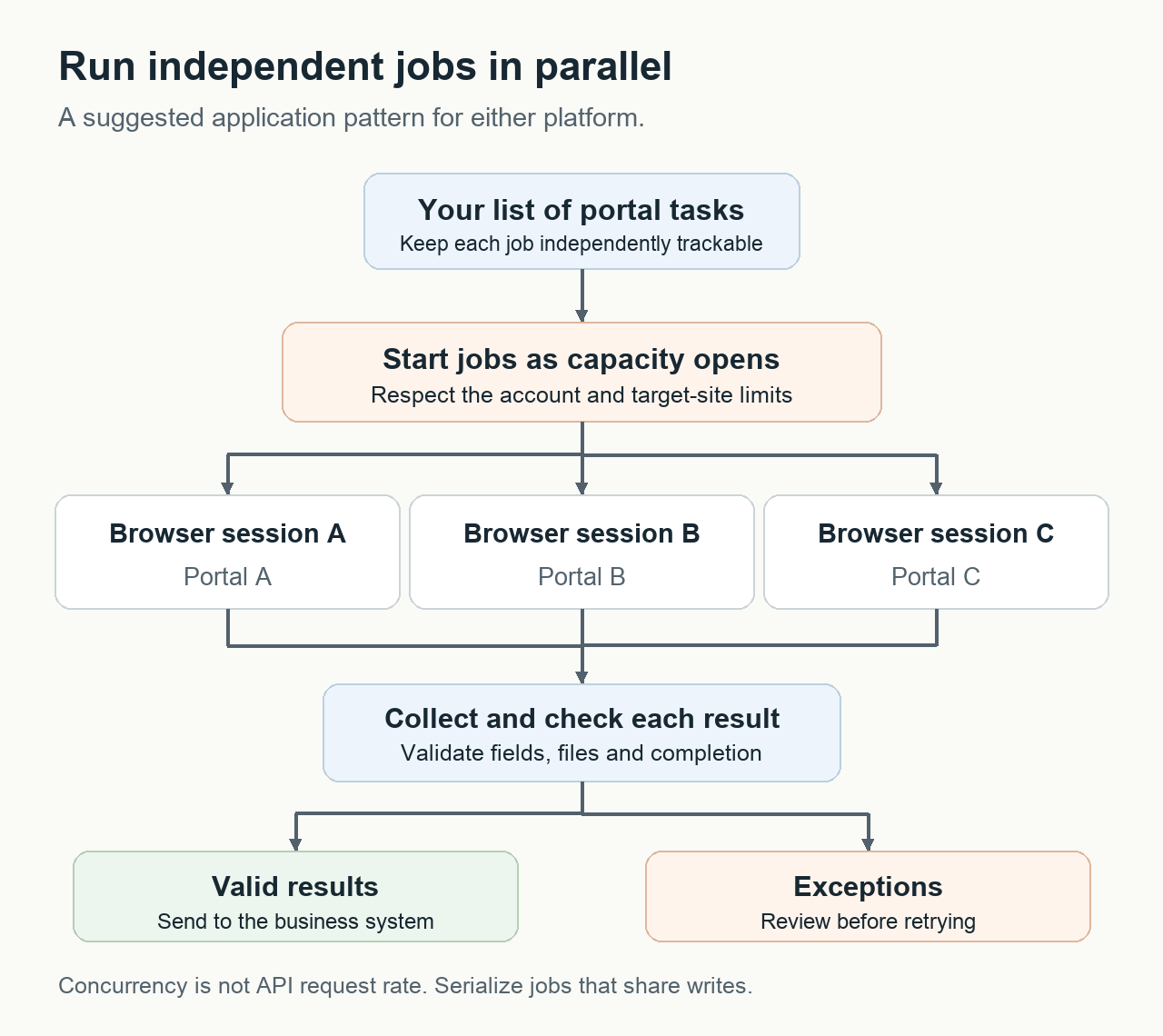
Most enterprises I work with need to automate work at a scale where processing one invoice or form at a time would take too long. They need parallel execution, with separate browser instances handling several jobs at once.
Both Skyvern and Browser Use support parallel runs. The number you can run at once depends on your cloud service limits or the capacity of your self-hosted deployment. For a large batch, you can queue the jobs and start another whenever a session becomes available. This lets you process more work in the same period without needing to speed up every individual run.
Structured output, authentication and failed runs
A useful automation needs to return the right data, get through the login and make failures understandable. Skyvern brings more of that work into its workflow builder and run views. Browser Use exposes the controls and records for an engineer to handle it in the surrounding application.
Structured data extraction
Skyvern lets you extract structured data and check it within a workflow:
- Web pages: The Extraction block can extract data from the current page. For example, it can extract the total displayed on an invoice page.
- Downloaded documents: The File Parser handles documents such as invoice PDFs, where you might need the individual line items.
- Checks before continuing: An AI Validation block can check whether the extracted data meets a condition, such as matching the expected billing period.
You define the output fields and their types with JSON Schema, so the next workflow step knows what data to expect.
Browser Use also supports page-text extraction. How you structure and check its results depends on the edition:
- Open source: Pydantic provides schema validation, checking that returned data matches the fields and types you defined in Python.
- Cloud V4: The hosted agent returns a string. Your application parses it and validates the data.
Skyvern is the better fit if you want to check extracted data without writing validation code. Its AI Validation block can check the result before the next workflow step runs. With Browser Use Cloud, your team implements those checks in your application.
Getting through logins and verification codes
Both tools can handle two-factor authentication. The setup depends on how the website verifies the login:
- Authenticator codes: Skyvern generates time-based one-time passwords (TOTP) from a saved secret. Browser Use Cloud can fill these codes through its 1Password integration.
- Email or SMS codes: Skyvern accepts codes through its UI or API, or fetches them from an API endpoint you configure. Your team connects the email or SMS delivery. Browser Use can read emailed codes in an agent inbox; SMS codes need forwarding to an inbox it can access.
- Human approval: Skyvern offers a Human Interaction block on Enterprise. Browser Use lets someone take over the browser session before the agent continues.
Skyvern is a convenient choice for recurring workflows because you can save the verification method with the credential and use it in a Login block. Browser Use is useful when you want the agent to receive verification emails in its own inbox. Both can reuse saved browser profiles while the login remains valid.
CAPTCHAs and anti-bot checks
Automatic CAPTCHA solving is included in both companies’ hosted browsers:
- Skyvern Cloud: Detects and solves CAPTCHAs during a run. Self-hosted Skyvern pauses for manual intervention instead.
- Browser Use managed browsers: Include automatic CAPTCHA solving and anti-detection features. You can use them with a hosted agent or connect your own agent to them.
For a workflow built in Skyvern, Cloud saves you from setting up a separate CAPTCHA solver. Browser Use’s managed browsers suit an existing agent that needs those browser services without moving the agent itself. Both also offer geographic targeting through their proxy settings, so the browser can access a website from a supported country.
Understanding a failed run
Skyvern’s run page gives you three ways to investigate a failure:
- Failure reason: See why the run stopped.
- Timeline and screenshots: Select a step to see the page and the agent’s recorded reasoning at that point.
- Recording: Replay the browser session to see what happened.
You can then open the workflow editor or rerun with the same inputs from that page. That makes Skyvern the more convenient choice for investigating and retrying a saved workflow.
Browser Use provides browser recordings and an ordered stream of run events. Those events are useful if you want to display progress and failures inside your own application, alongside the other work it handles.
Pricing and speed
Skyvern bundles usage and features into monthly plans. Browser Use charges for browser time, traffic and model usage as you go. The better deal depends on how often you run the automation and which features you need.
Skyvern pricing
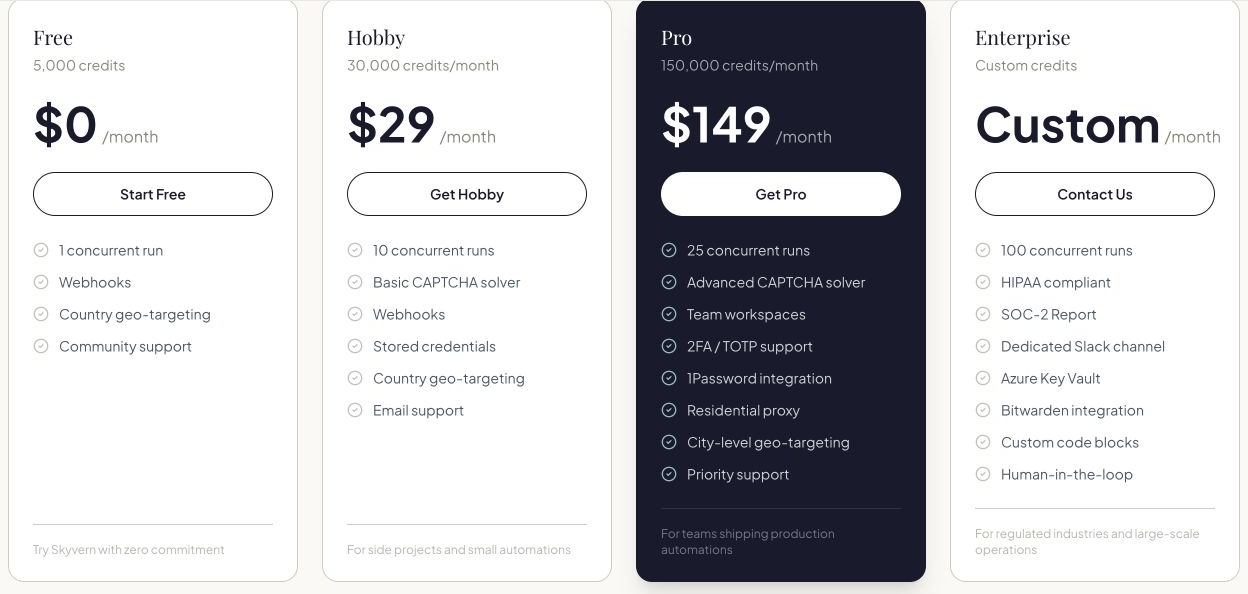
Skyvern’s plans give you a credit allowance and a set of features:
- Free: 5,000 credits to try the product.
- Hobby: $29 per month for 30,000 monthly credits.
- Pro: $149 per month for 150,000 monthly credits, including 2FA/TOTP and 1Password integration.
- Enterprise: custom pricing, with features such as custom code blocks and human interaction.
Browser Use pricing
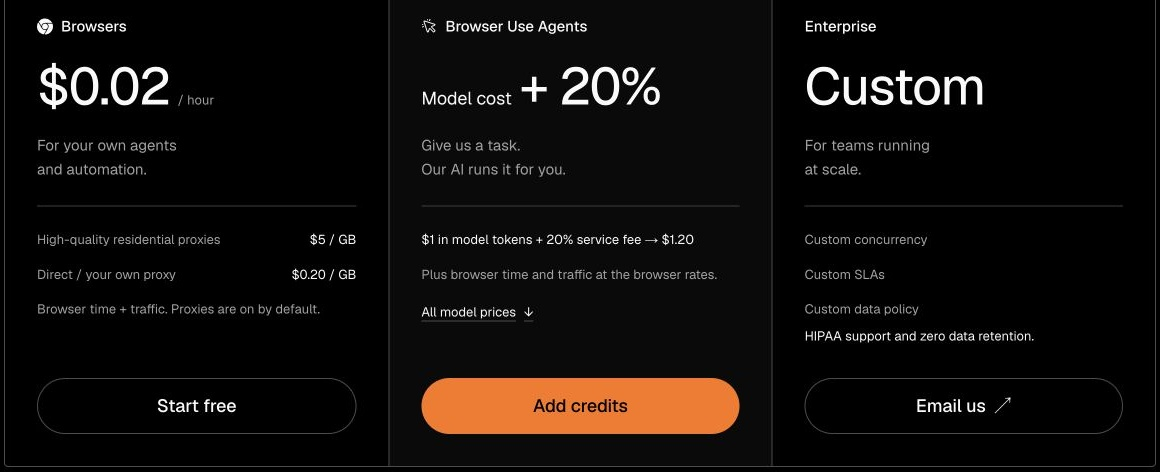
Browser Use’s pricing separates browser infrastructure from the hosted agent:
- Browser time: $0.02 per hour.
- Traffic: $5 per GB through its residential proxies, or $0.20 per GB for direct traffic or your own proxy. Your proxy provider may charge separately.
- Hosted agent: model cost plus a 20% service fee, on top of browser time and traffic. The published token-price table already includes that fee.
- Credits: no subscription and no expiry, which suits intermittent workloads.
Wrapping up
We built Skyvern to help operations teams handle more work without adding people every time volume increases. For our customers in healthcare, finance and insurance, that means letting process experts build and change automations while engineers connect them to existing systems.
Browser Use is a good choice when your engineers need to customize an agent inside an application. I recommend Skyvern for recurring business workflows because it brings visual editing and data validation together with the tools to investigate and rerun failed jobs.